 My Moving Buddy
MOVING GUIDE · PACKING
How to label moving boxes (and know what’s inside)
Give every box a number and the room it’s going to, and write both on the top and on two sides. Keep what’s inside on a list, not on the box. A list is quicker to search than a stack of boxes, and on moving day a missing number is obvious at a glance.
What to write on every box
- A number. One sequence for the whole move: 1, 2, 3… Not “Kitchen 3”. A box that ends up holding things from two rooms breaks that scheme.
- The room it’s going to. Use the new home’s room names (“Back bedroom”, not “Sam’s old room”), so whoever carries it in knows where to put it down.
- OPEN FIRST, on the few boxes you’ll need on night one: kettle, bedding, chargers, toilet paper, medicine.
- FRAGILE and THIS WAY UP where they’re true. If everything says fragile, nothing does.
Write on the top and two neighbouring sides. In a stack, the top of a box is hidden and so is one side, so a single label is easy to miss. A thick marker on masking tape or a sticker is easier to read than writing straight on printed cardboard.
Why the contents go on a list, not the box
- There isn’t room. “Kitchen stuff” fits on a box. “Kettle, mugs, the good knife, tea” is what you need when you’re looking for the kettle.
- You can search a list. Find “passports” in a list in seconds, instead of reading the side of forty boxes.
- The box tells a passer-by nothing. “14 · Study” on a box left on the footpath or in a storage unit doesn’t advertise what’s worth taking.
- The list travels with you. Keep it on your phone and you can check a box without opening it, while it’s still in the truck.
The list can be paper, a spreadsheet or an app. If you want a spreadsheet, start from our free moving box inventory template.
Optional: colour by room
Pick one colour of tape or sticker per room and put the same colour on that room’s door in the new home. It helps when friends or movers are carrying boxes in. Keep the room name on the box too, because colours are hard to tell apart in a dim hallway.
Keeping the list in My Moving Buddy (our app)
The app doesn’t print labels: you still write the number on the box with a marker. What it does is keep the list behind the number, with photos.
- Add what goes in the box. Open Add items and type it, take a photo or say it.
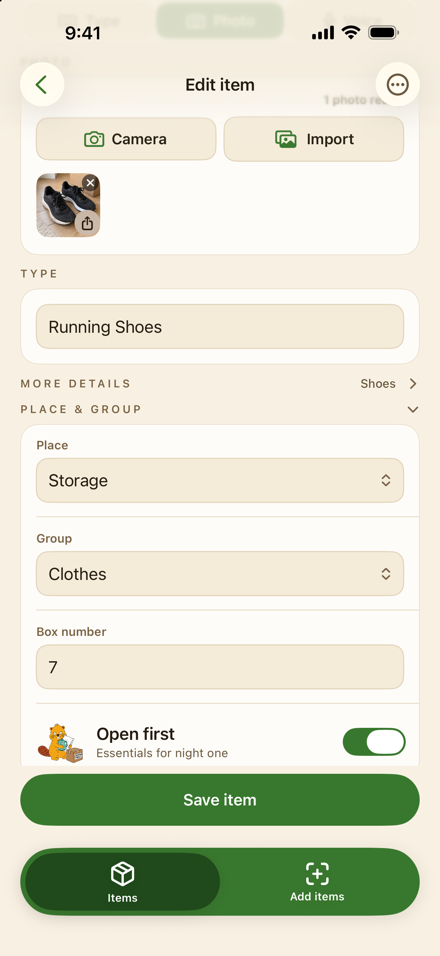
- Give it the box number. Under Place & group, choose where it’s going, type the box number and turn on Open first for night-one essentials.
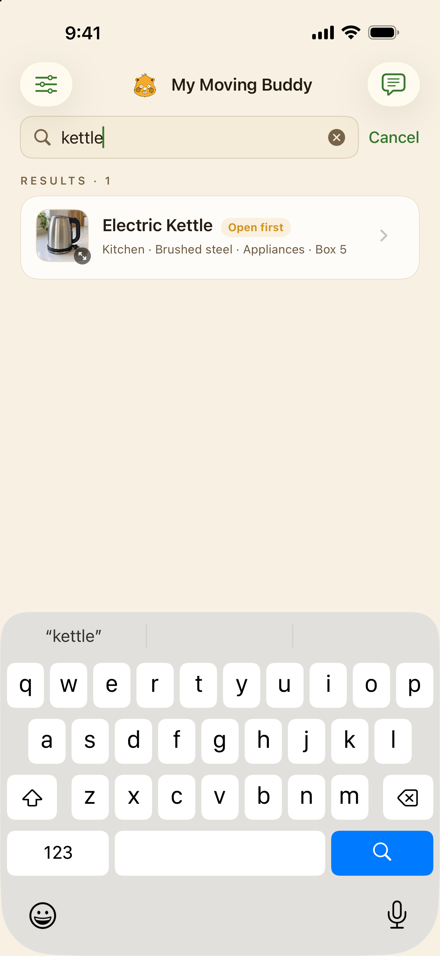
- Find it later. Pull down on Items to Find. Search by name (“kettle”) to get the box number, or type “box 12” to see everything in box 12.
- Print the list if you want one on the wall. Save a copy as a PDF lists each box with where it’s going, how many items are in it and an OPEN FIRST marker. Excel and CSV copies have the same box numbers.
- Tick things off as they arrive. The Moving day checklist lets you tick items as they come in, place by place.
My Moving Buddy (our app) keeps the list on your iPhone: box numbers, photos, Open first, search and a moving-day checklist. Free for your first 30 items, then a one-time unlock. No account.

On moving day
Count numbers as boxes come off the truck. With one sequence, a gap (“we have 1 to 38, but not 23”) shows a missing box before the truck leaves. Load the OPEN FIRST boxes last so they come off first, or keep them in the car.